Troubleshooting Guide: Balancing Function Not Working on JiKong BMS
Issue Description:
The cell balancing switch is turned ON, but the Battery Management System (BMS) protection board is not performing balancing. The user believes the cell balancing function is ineffective.
Analysis & Solution:
When the BMS balancing function is enabled, ask the customer to provide a screenshot of the "Parameter Settings" page in the JiKong app (see example figure).
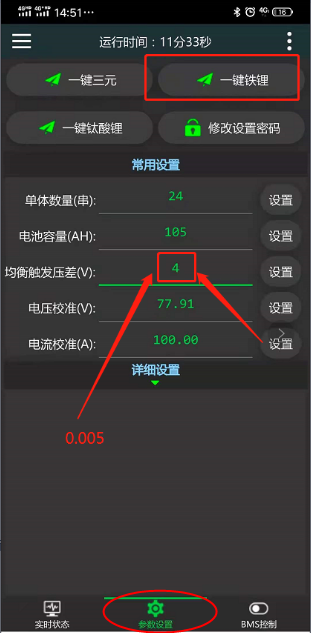
The screenshot reveals that the customer has set the "Balancing Trigger Voltage Difference" to 4V, which is incorrect. This value should be changed to 0.003V or higher. Alternatively, using the system's default trigger value of 0.01V will restore the balancing function.
Important Reminders:
The JiKong BMS requires all of the following conditions to be met before cell balancing can activate:
1. The actual number of battery cells in series matches the configured number. There should be no warning message stating "Cell count does not match settings."
2. There is no warning indicating "Balancing wire resistance is too high."
3. The actual voltage difference between cells must be greater than the "Balancing Trigger Voltage Difference" set in the parameters.